Unlocking Creative Potential: A Guide to Using Hand Drawn Frame Clipart in Modern Design
In the rapidly evolving world of digital design, there is a growing appreciation for elements that feel authentic, personal, and human. While sleek, geometric vectors have their place, many creators are turning toward organic aesthetics to connect more deeply with their audiences. This is where the Hand Drawn Frame Clipart Bundle becomes an invaluable resource. By integrating hand-sketched elegance into your projects, you can transform ordinary layouts into captivating visual stories. This article explores the significance of these design elements, how they function across various mediums, and why they are essential for both novice crafters and professional designers.
The Appeal of Hand-Sketched Aesthetics
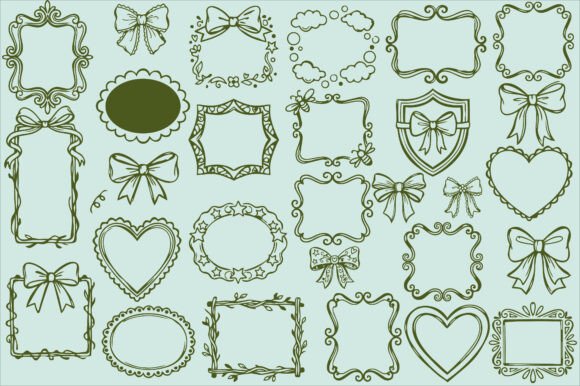
Why do hand-drawn elements resonate so strongly in today’s digital landscape? The answer lies in imperfection. Unlike computer-generated shapes that are mathematically precise, hand-drawn frames, bows, and borders carry the subtle irregularities of the human hand. These slight variations create a sense of warmth and approachability. When you add a touch of whimsical charm to a design, it signals to the viewer that a real person was involved in the creation process.
This aesthetic is particularly powerful in industries that value authenticity, such as handmade goods, wedding planning, and personal blogging. A delicate ribbon or a leafy border does more than just decorate a page; it sets a tone. It suggests care, attention to detail, and a romantic or vintage sensibility that sterile, corporate graphics often lack. Understanding this psychological impact is the first step in using these assets effectively.
Versatility Across Creative Projects
One of the most significant advantages of a comprehensive clipart bundle is its versatility. A collection featuring 50 unique elements, including whimsical borders, delicate ribbons, and charming frames, serves as a foundational toolkit for a wide array of creative endeavors. Let us explore how these assets fit into different aspects of modern creativity.
- Wedding and Event Stationery: Weddings are inherently romantic events. Using romantic heart frames and ornate vintage-style boxes can elevate invitations, place cards, and menus. The hand-drawn quality mirrors the personal nature of the celebration.
- Product Packaging: For small business owners, packaging is a crucial touchpoint. Beautiful labels and hang tags adorned with cute bows or leafy borders can make handmade goods feel premium and gift-ready.
- Digital Scrapbooking: In the digital age, preserving memories often happens on screens. Hand-drawn frames provide a cozy, nostalgic feel to digital albums, bridging the gap between traditional paper scrapbooking and modern technology.
- Social Media Graphics: In a feed saturated with content, standing out is key. Adding stylish borders to quotes, announcements, or product photos can stop the scroll and draw the eye to your message.
- Print-on-Demand: From journals and planners to t-shirt designs, these elements are perfect for merchandise. They allow creators to produce unique, sellable items without needing advanced illustration skills.
Understanding File Formats: A Technical Breakdown
To fully leverage a Hand Drawn Frame Clipart Bundle, it is essential to understand the file formats included. Many beginners overlook the importance of file types, which can limit how and where they use their designs. A high-quality bundle typically includes SVG, PNG, JPG, and EPS files. Each serves a distinct purpose.
SVG Files: The Power of Scalability
SVG (Scalable Vector Graphics) files are perhaps the most versatile format for modern crafters. These are clean, scalable vector files that maintain their quality regardless of size. Whether you are creating a tiny sticker or a large banner, an SVG will remain crisp and clear. They are specifically optimized for cutting machines like Cricut and Silhouette. If you are interested in physical crafts, such as vinyl decals or paper cutouts, SVGs are indispensable.
PNG Files: Transparency and Ease of Use
PNG (Portable Network Graphics) files are ideal for digital design and layering. The key feature here is the transparent background. High-resolution 300 DPI PNGs allow you to place a frame or bow over any background color or image without a white box surrounding it. This makes them perfect for digital scrapbooking, web design, and social media graphics where quick drag-and-drop functionality is required.
JPG and EPS: Printing and Professional Editing
JPG files are high-quality images suitable for easy printing and general digital use. While they do not support transparency, they are universally compatible and easy to share. On the other hand, the Master EPS (Encapsulated PostScript) file is a fully editable vector file. This is crucial for professional customization. If you need to change the color of a ribbon or adjust the thickness of a border in software like Adobe Illustrator, the EPS file provides the necessary flexibility.
Practical Applications for Small Businesses
For entrepreneurs and small business owners, time is money. Creating custom illustrations from scratch is time-consuming and often requires expensive software skills. A pre-made bundle offers a cost-effective solution. Because these assets are commercial use friendly, they are ready for your small business projects immediately.
Consider a local bakery launching a new line of artisan cookies. By using the delicate ribbons and vintage-style frames from the bundle, they can design elegant hang tags that convey a sense of homemade quality. Similarly, a wedding planner can use the leafy borders to create cohesive branding materials for clients, ensuring that every invitation and menu feels part of a unified, elegant theme.
Enhancing Digital Presence
In the realm of online marketing, visual consistency builds brand recognition. Using a consistent set of hand-drawn elements across your website, email newsletters, and social media posts creates a cohesive brand identity. For example, a lifestyle blogger might use the same style of whimsical border for all their quote graphics. Over time, followers begin to associate that specific artistic style with the blogger’s brand, fostering trust and familiarity.
Common Misconceptions About Clipart
There is a lingering misconception that using clipart results in generic or unprofessional designs. This assumption stems from the low-quality, pixelated images of the past. Today’s high-quality bundles, featuring 300 DPI resolution and vector capabilities, defy this stereotype. When used thoughtfully, these elements enhance rather than detract from professionalism.
The key is customization. Do not simply drop a frame onto a page and leave it. Adjust colors to match your brand palette. Combine different elements, such as pairing a heart frame with a delicate ribbon, to create unique compositions. The goal is to use these tools as a starting point for your own creative expression, not as a crutch.
Getting Started with Your Bundle
If you are new to using digital assets, here is a simple workflow to get started:
- Organize Your Files: Create folders on your computer for SVG, PNG, JPG, and EPS files. This saves time when you are in the middle of a project.
- Choose Your Platform: Decide whether you are working in a design tool like Canva, Photoshop, or a cutting machine software. Select the appropriate file format (PNG for Canva/Photoshop, SVG for cutting machines).
- Experiment with Layering: Try placing text inside the frames. Add bows to the corners of your images. Play with opacity and blending modes to see how the elements interact with your background.
- Check Licensing: Always review the license agreement. Most commercial-use-friendly bundles allow you to sell products created with the art, but they may restrict reselling the digital files themselves.
Conclusion
The Hand Drawn Frame Clipart Bundle is more than just a collection of images; it is a gateway to enhanced creativity. By offering a mix of whimsical borders, delicate ribbons, and charming frames, it empowers users to add a touch of elegance to any project. Whether you are designing wedding stationery, creating social media content, or packaging handmade goods, these versatile elements provide the professional polish and personal touch that modern audiences crave.
Understanding the technical aspects of SVG, PNG, and EPS files ensures you can use these assets to their full potential. By moving beyond misconceptions and embracing the flexibility of digital clipart, you can streamline your workflow and elevate your design game. So, dive in, experiment with the 50 unique illustrations, and let your creativity flourish with the help of hand-sketched elegance.